By clicking “Accept”, you agree to the storing of cookies on your device to enhance site navigation, analyze site usage, and assist in our marketing efforts. View our Privacy Policy for more information.
Best OneTrust Alternatives for Third-Party Risk Management in 2026
Compare OneTrust alternatives built specifically for third-party risk, including ProcessUnity, Panorays, Prevalent, ServiceNow and Risk Ledger, using real G2 and Gartner Peer Insights data.
Risk Ledger
|
Company
August 7, 2026
|
14
mins read
Share
Why security and GRC teams look for a OneTrust alternative for TPRM
OneTrust is a broad governance, risk and compliance platform where third-party risk management is one module inside a much wider suite spanning privacy, consent, ethics and AI governance.
Teams usually start comparing alternatives when that breadth becomes the actual problem, not a bonus.
Two patterns come up often:
The first is scope: Reviewers describe the platform as comprehensive but heavy, with a learning curve that falls hardest on new admins. One reviewer notes the tool is vast because it covers multiple areas, and the learning curve for OneTrust admins can be a daunting task, even with certifications available. That's a fair trade for a team that genuinely needs privacy, ethics and third-party risk under one roof. It's a worse one for a team that only needs the third-party piece.
The second is cost and configuration: Independent GRC comparisons note that buying a full governance suite when the real need is compliance automation, or a narrower workflow, usually means paying for organisational complexity a smaller job doesn't require.
None of this makes OneTrust a weak TPRM tool. Reviewers praise the automated workflows and quick reporting in OneTrust Tech Risk & Compliance for cutting manual effort and making audits less stressful. The mismatch shows up specifically for teams whose main job is supplier assurance, not governance consolidation across multiple domains.
Why teams look elsewhere
Why security and GRC teams look for a OneTrust alternative for TPRM
OneTrust scores well on breadth. The friction reviewers name most often is what that breadth costs a team whose main job is third-party risk on its own.
Why teams look for a OneTrust alternative for TPRM
Friction point
What reviewers say
Worth testing
TPRM is one module inside a much wider suite
Reviewers describe the platform as vast because it spans privacy, ethics, AI governance and third-party risk together, and say the learning curve for new admins can be daunting even with certifications available.
How much of the wider suite you'd actually use if TPRM is the only job.
Cost and configuration scale with the whole suite
Independent GRC comparisons note that buying a full governance platform when the real need is a narrower workflow usually means paying for organisational complexity that job doesn't require.
Whether pricing is tied to the modules you use or the whole platform.
The TPRM workflow itself still scores well
Reviewers praise the automated workflows and quick reporting in OneTrust's tech risk and compliance product, saying they cut manual effort and make audits less stressful.
Whether that workflow quality still holds once you strip away the rest of the suite.
Practical test
If OneTrust is on your shortlist mainly for third-party risk, ask what a licence would look like scoped to that module alone. If the answer is "it doesn't work that way," that's the suite-versus-job mismatch showing up in pricing, not just in the interface.
OneTrust alternatives at a glance
The alternatives covered in this guide, in order of what most closely challenges OneTrust's actual TPRM job rather than its broader suite:
Risk Ledger: best for supplier-verified evidence and connected supply chain visibility
OneTrust: best for organisations that need TPRM inside a broader GRC and privacy programme
ProcessUnity: best for highly configurable enterprise TPRM
Panorays: best for combining assessments with attack-surface monitoring
Prevalent: best for a flexible, hybrid TPRM model
ServiceNow: best for teams already standardised on ServiceNow
This is not a universal ranking. A team weighing OneTrust against another broad GRC suite has a different decision to make than a team that only needs the TPRM job done well.
How we compared: this guide draws on real G2 and Gartner Peer Insights reviews for each platform.
OneTrust alternatives comparison
OneTrust alternatives compared
Compare evidence model, supplier participation, monitoring and supply
chain visibility across the platforms security and GRC teams
evaluate alongside OneTrust for third-party risk.
How we compared:
Drawn from current G2 and Gartner Peer Insights review data for each
platform, supplemented with vendor community sources where G2 review
volume was thin.
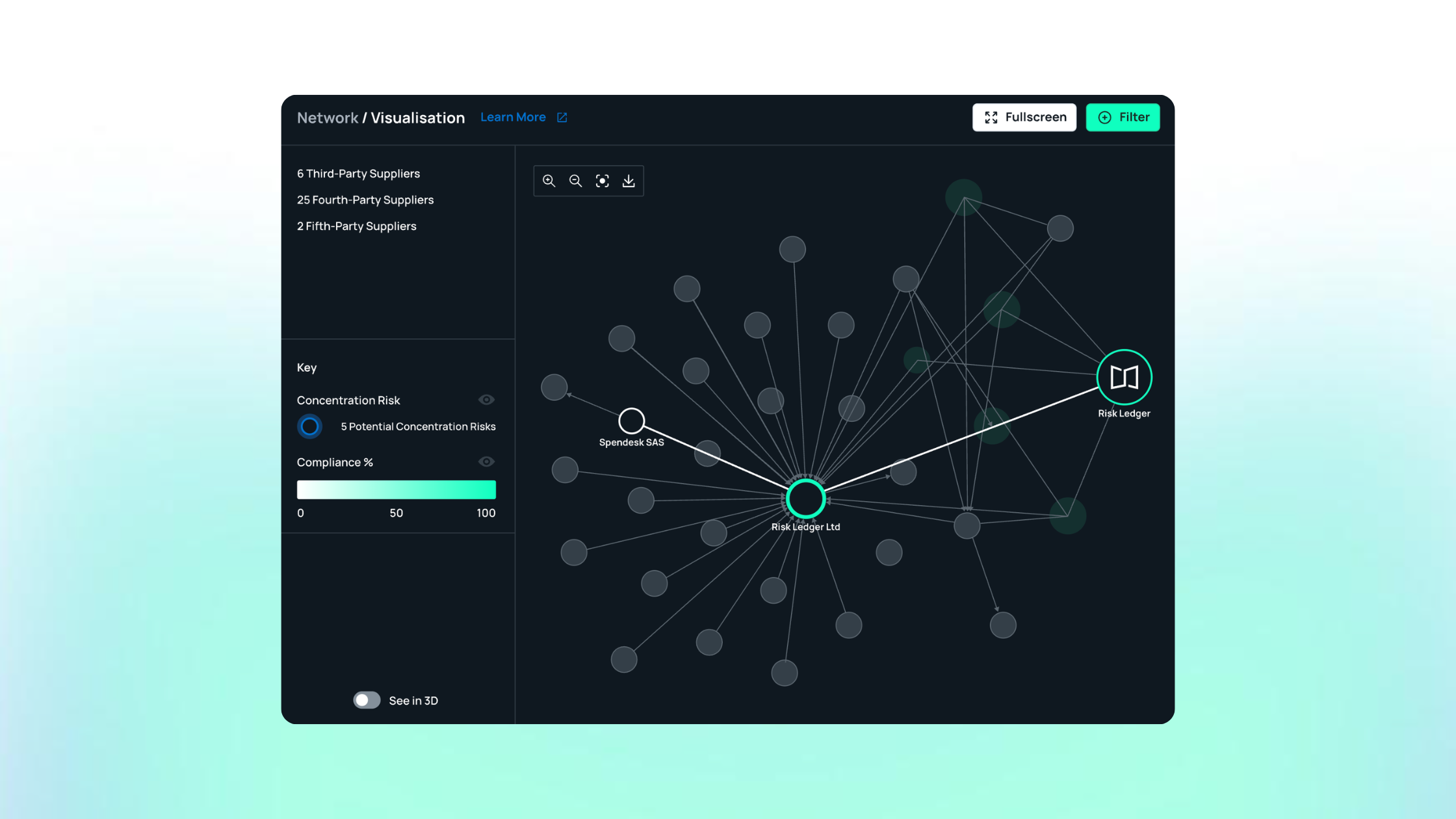
Risk Ledger
Network-first TPRM
Risk Ledger comparison
Best for
Supplier-verified evidence and connected supply chain visibility
Primary approach
A connected network where suppliers maintain one reusable security profile and each customer applies its own policies, criticality and risk context on top of it.
Supplier evidence
Standardised supplier information is maintained once and reused across every connected customer relationship, rather than rebuilt per assessment.
Monitoring
Tracks changes to supplier controls and evidence over time, with external signals supporting emerging-threat investigation.
Supply chain visibility
Native nth-party visibility, since suppliers declare their own critical dependencies directly rather than having them inferred from a scan.
Supplier participation
Suppliers can join and maintain profiles free of charge, which reviewers cite as easing a common adoption barrier once they've completed the initial setup.
Operating effort
Reduces repeated collection and supplier chasing; some reviewers note getting a minority of suppliers to participate can still take persistence, and the interface has room to be more intuitive.
Key consideration
Not a broad enterprise GRC suite. Built specifically for security-led supplier assurance and network visibility, which is where it's strongest against OneTrust's broader remit.
OneTrust
Broad GRC suite
OneTrust comparison
Best for
Organisations that need TPRM inside a broader GRC and privacy programme
Primary approach
Third-party risk management sits as one module inside a much wider platform spanning privacy, ethics, AI governance and enterprise compliance.
Supplier evidence
A shared risk exchange lets vendors self-certify assessments once and share them across OneTrust's customer base, supplemented by configurable questionnaires.
Monitoring
Integrates third-party cyber risk feeds from external providers to trigger critical-event workflows and reassessment.
Supply chain visibility
The platform's strength is governance breadth rather than network visibility; nth-party mapping isn't the product's centre of gravity.
Supplier participation
Vendors respond through structured, configurable assessment workflows rather than a portable, reusable profile.
Operating effort
Reviewers consistently describe the platform as vast, with a learning curve that falls hardest on new admins, and pricing that scales with the whole suite rather than the TPRM job alone.
Key consideration
Genuinely strong where TPRM is one part of a wider governance consolidation. Less efficient where TPRM is the only job to be done.
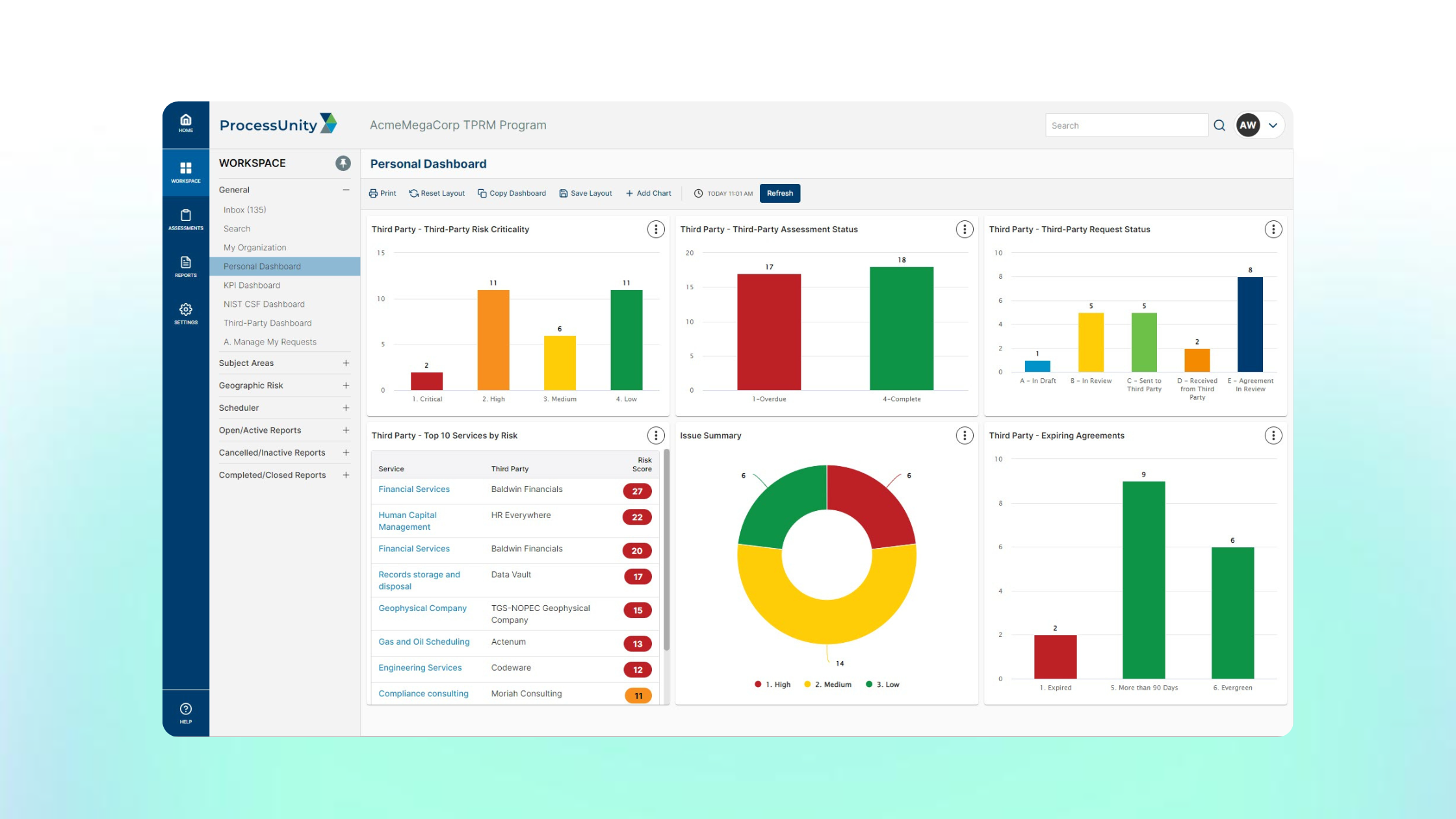
ProcessUnity
Configurable enterprise TPRM
ProcessUnity comparison
Best for
Highly configurable enterprise TPRM workflows
Primary approach
Configurable lifecycle workflows built specifically for TPRM, plus a shared risk data exchange with reusable vendor profiles.
Supplier evidence
Exchange data reduces some duplicate assessment work across the ecosystem; a vendor portal supports evidence submission and updates.
Monitoring
A threat and vulnerability response module ties external intelligence to fourth-party mapping.
Supply chain visibility
Exchange data gives visibility into a vendor before a full assessment completes; reviewers describe it as a shared pool rather than a profile the supplier owns and actively maintains.
Supplier participation
Vendors submit evidence through a dedicated portal built for the TPRM workflow specifically, which reviewers rate highly for support quality.
Operating effort
Reviewers consistently note configuration changes require careful planning, and advanced reporting can require specialist administrators. On G2, ProcessUnity rates 4.5/5 from 54 reviews, ahead of OneTrust's TPRM-specific listing on Gartner's own alternatives ranking (4.6/5 from 106 ratings).
Key consideration
Built specifically for TPRM rather than bolted onto a wider suite; that focus comes with real administrative overhead for smaller teams.
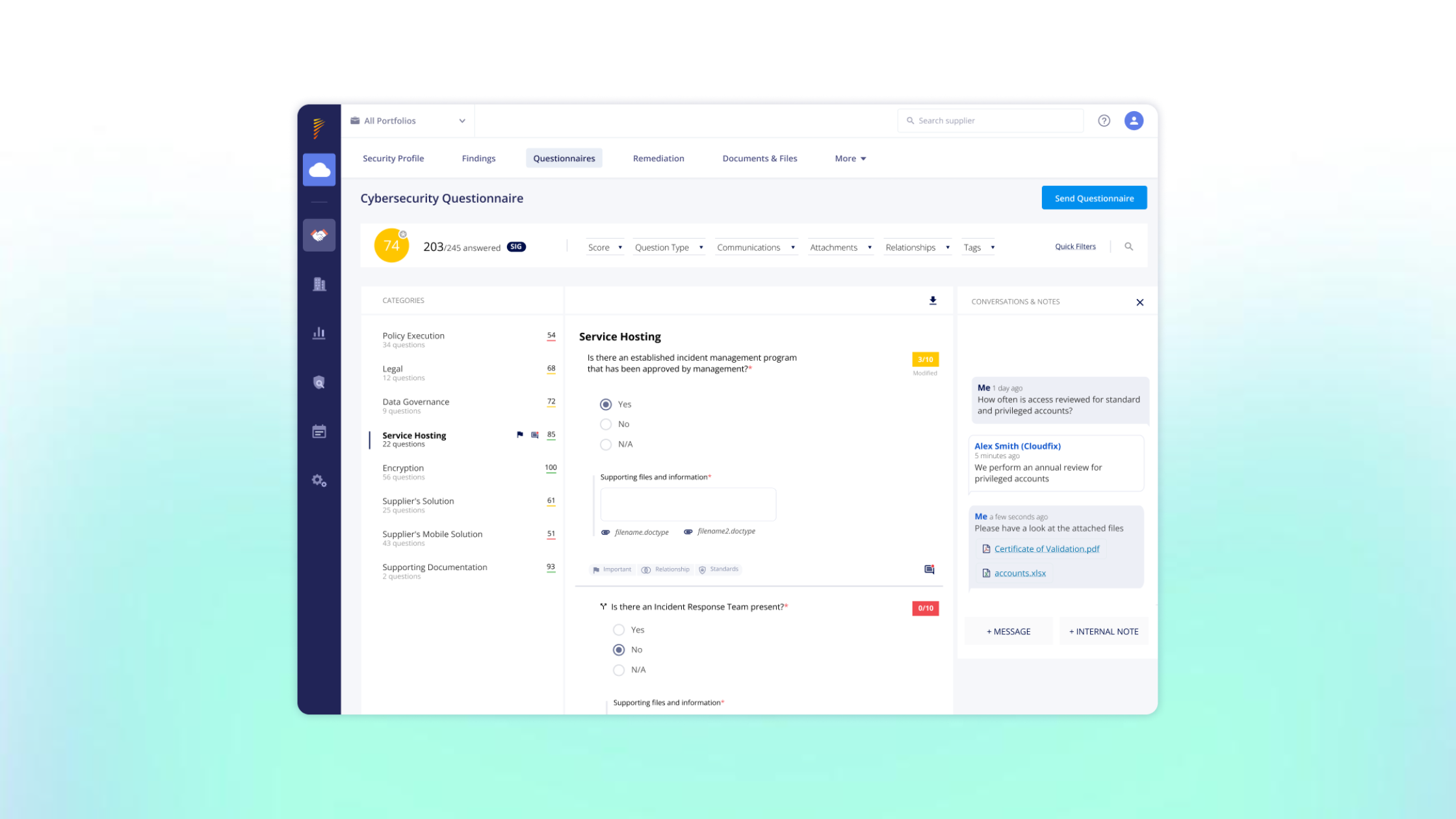
Panorays
Assessments + monitoring
Panorays comparison
Best for
Combining assessments with attack-surface monitoring
Primary approach
Automated vendor questionnaires plus continuous external scanning in a single dashboard, aimed at security-led rather than procurement-led programmes.
Supplier evidence
Automated questionnaires and evidence collection; reviewers consistently praise ease of use and clear visual dashboards.
Monitoring
Continuous posture scanning sits alongside assessment data, producing a blended risk score from 0-100.
Supply chain visibility
Fourth-party discovery is built in, surfaced through scanning rather than declared by the supplier directly.
Supplier participation
Vendors respond through structured workflows; role granularity for larger teams managing multiple user groups is a noted limitation.
Operating effort
Reviewers flag a lack of clarity in vendor oversight and occasional false positives alongside the automation gains, plus onboarding effort and cost.
Key consideration
Strong for teams that want assessments and scanning combined in one cyber-first workflow, more than teams whose TPRM sits under procurement or compliance.
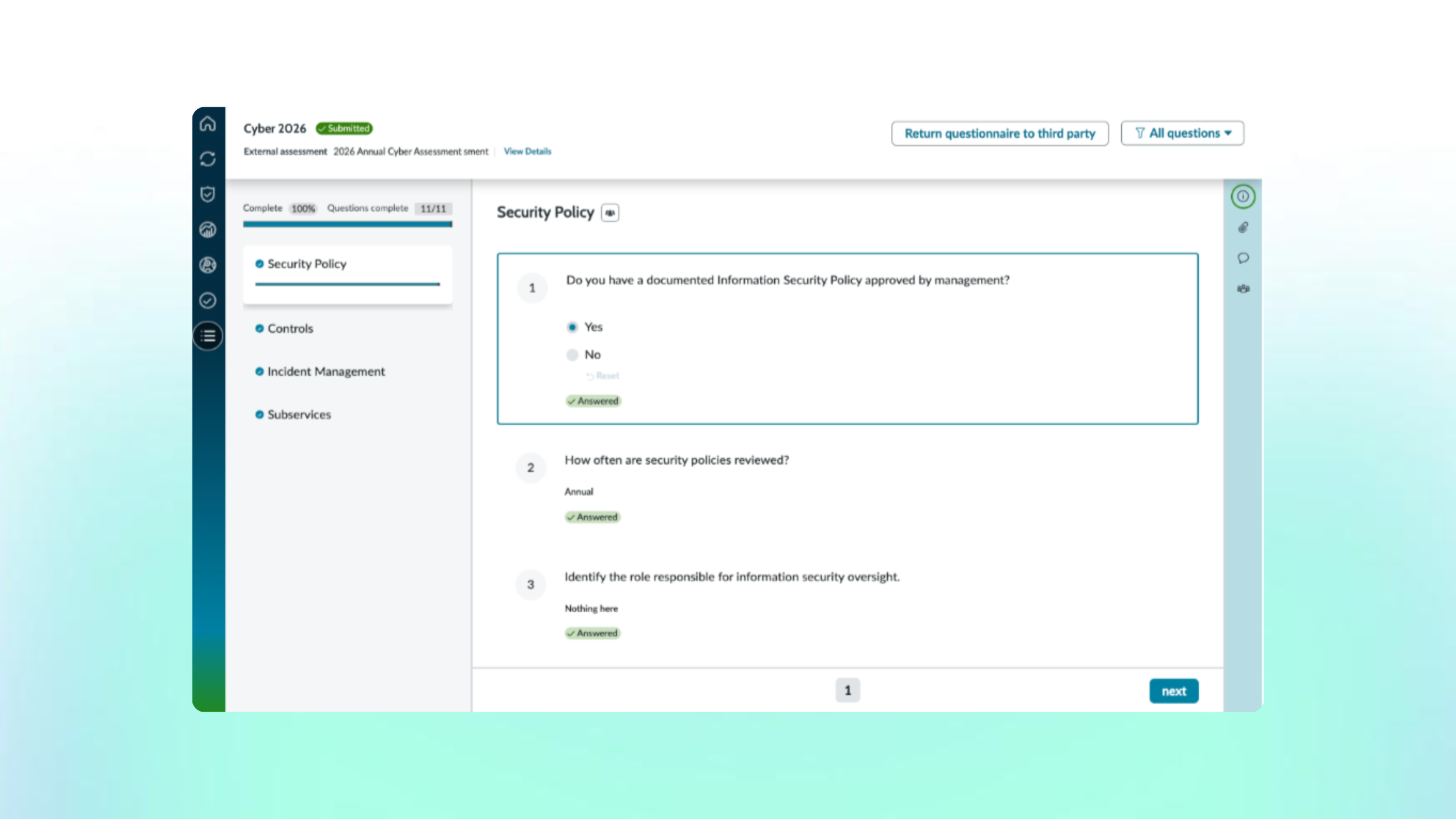
Prevalent (by Mitratech)
Hybrid TPRM model
Prevalent comparison
Best for
A flexible, hybrid approach to TPRM
Primary approach
Point-in-time risk assessments combined with automated monitoring, plus an exchange for sharing completed vendor risk reports across the network.
Supplier evidence
Vendors complete assessments that feed a security rating; reviewers on Gartner Peer Insights rate the platform 4.2/5 from 124 ratings, one of the higher-volume alternatives OneTrust customers compare against directly.
Monitoring
Automated monitoring tracks emerging third-party risks between formal reassessment cycles.
Supply chain visibility
The vendor exchange model can surface fourth-party context; some published comparisons flag that its scoring range is narrower than several ratings-led competitors, worth testing directly rather than taking at face value.
Supplier participation
Reviewers on G2 highlight a consistent, slick interface across third parties and note it has brought a level of standardisation they didn't have before.
Operating effort
Support quality rates highly among reviewers; noted drawbacks include limited dashboard customisation and integration options.
Key consideration
A solid, purpose-built TPRM alternative for teams that want hybrid assessment-plus-monitoring without OneTrust's wider governance scope.
ServiceNow Vendor Risk Management
Platform-led TPRM
ServiceNow Vendor Risk Management comparison
Best for
Teams already standardised on ServiceNow
Primary approach
Third-party risk workflows built on the Now Platform, connecting vendor assessments to the same case management and workflow engine used for ITSM and IRM.
Supplier evidence
Structured due-diligence and questionnaire workflows; one Gartner Peer Insights reviewer was impressed by the platform's flexibility and its ability to support customised workflow.
Monitoring
Third-party risk data connects to ServiceNow's broader IRM and incident tooling for downstream remediation.
Supply chain visibility
Vendor concentration and geographic clustering views exist within the module; native nth-party visibility isn't the primary design centre.
Supplier participation
Vendors engage through a dedicated portal; ServiceNow's own community forum shows practitioners have found the module's rename from Vendor Risk to Third-Party Risk Management, and its customisation limits, worth flagging before migrating.
Operating effort
The dedicated TPRM listing on G2 has too little independent review volume to lean on; ServiceNow's broader GRC/IRM products rate around 4.2-4.4/5 with reviewers citing high licensing costs and steep implementation requirements.
Key consideration
Strong where TPRM needs to sit inside an existing ServiceNow estate; less efficient as a first platform bought specifically for third-party risk.
OneTrust: best for organisations that need TPRM inside a broader GRC and privacy programme
OneTrust is a broad governance, risk and compliance platform where third-party risk management is one module inside a much wider suite spanning privacy, consent, ethics and AI governance.
Strengths
Reviewers praise the automated workflows and quick reporting, saying they cut manual effort and make audits less stressful
The platform offers comprehensive coverage of 50-plus pre-mapped compliance frameworks and a broad integration ecosystem connecting 200-plus enterprise tools
A shared risk exchange lets vendors self-certify assessments once and share them across OneTrust's customer base, reducing some duplicate work
Strong fit for teams that want privacy, ethics, AI governance and third-party risk consolidated in one platform rather than stitched together across point solutions
Drawbacks
Reviewers describe the tool as vast because it covers multiple areas, and say the learning curve for OneTrust admins can be a daunting task
Independent analysis reports that a majority of mid-market customers use only a fraction of the platform's features relative to what they pay for
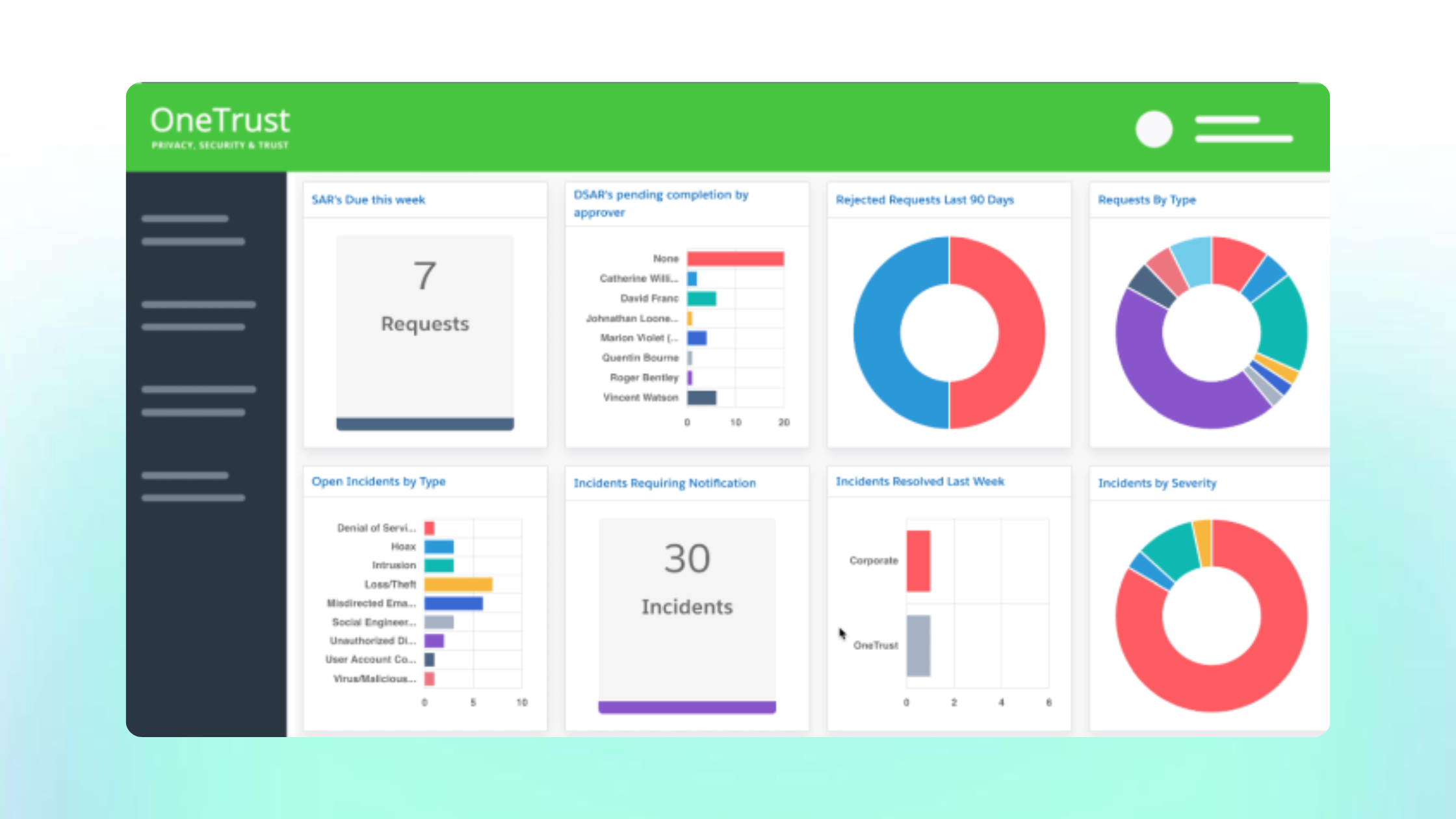
Some reviewers flag that the dashboard UI needs a refresh and that pricing runs high compared with more focused alternatives
The shared exchange is closer to a self-attested vendor pool than a profile any one supplier actively owns and keeps current, similar to the trade-off in ProcessUnity's exchange model
Best use case
Organisations that already run OneTrust for privacy or compliance and want third-party risk consolidated into the same platform, with the resource to manage that scope, rather than teams buying a tool specifically and only for TPRM.
Common misconception
OneTrust's Third-Party Risk Exchange
A shared exchange and a supplier-declared profile sound similar on a feature list. They behave differently once a supplier's posture actually changes.
Feels likeReusable, current evidence
Vendors self-certify an assessment once, and that record is available to other OneTrust customers, so it reads as the same "assess once, reuse everywhere" model as a supplier network.
Actually missesWho owns keeping it current
A self-attested record in a shared pool isn't the same as a profile the supplier actively owns and updates as their controls change, and it's worth asking directly how OneTrust's exchange handles that distinction versus taking the reuse claim at face value.
Practical test
Ask whether a supplier updating their evidence on the exchange automatically refreshes what every connected customer sees, or whether each customer still needs to trigger and review that update separately.
Risk Ledger: best for supplier-verified evidence and connected supply chain visibility
Risk Ledger is a network-first supplier assurance platform where suppliers maintain one security profile and reuse it across every connected customer relationship, rather than completing a fresh assessment for each one.
Strengths
Suppliers maintain one profile shared across customer relationships, rather than repeating the same assessment for every customer that asks
Supplier-declared dependencies feed direct nth-party visibility, the reverse of the inferred mapping every scanning-led platform in this guide relies on
Suppliers can join and maintain profiles free of charge, removing a common barrier to participation once onboarding is underway
Reviewers describe the platform as a simple, centralised way to manage third-party cyber risk, with suppliers sharing security information once to reduce duplicate assessments
Drawbacks
Built specifically for security-led supplier assurance, so teams whose main need is consolidating privacy, ethics and enterprise risk into one platform may find a broader GRC suite a better core fit
Getting every supplier to participate can still take persistence, even where joining costs the supplier nothing, a friction point shared across most network and exchange-based TPRM models
Best use case
Security-led teams that need supplier-verified evidence, reduced duplicate assessment work and visibility into nth-party dependencies, more than teams that want third-party risk folded into a single broad GRC suite alongside privacy, ethics and AI governance.
ProcessUnity: best for highly configurable enterprise TPRM
ProcessUnity is a configurable enterprise TPRM platform built around a shared risk data exchange that gives some visibility into a vendor before a full assessment is run.
Strengths
Reviewers describe the tool as highly configurable with an intuitive UI that lets a savvy business user administer it without IT intervention, supporting rapid adaptation to regulatory or business changes
G2 reviewers highlight that ProcessUnity provides excellent user access control and workflow automation, with a workflows score of 9.4 out of 10
The Global Risk Exchange gives visibility into a vendor before a full assessment completes, reducing some duplicate work across the ecosystem
Reviewers consistently praise a high-quality support team with quick response times and deep product knowledge
Drawbacks
Users tend to dislike the platform mainly for poor performance, including slow loading and timeouts
Reviewers note that without documentation explaining the rationale behind past customisations, a new administrator lacks the context needed to understand the setup
The exchange is closer to a shared data pool than a profile any one supplier actively owns and keeps current themselves
Independent analysis notes the platform's licensing model and feature tiers can mean significant investment that's difficult to justify for smaller vendor portfolios
Best use case
Mature enterprise programmes with dedicated TPRM resource that need deep configurability and a purpose-built TPRM tool, more than teams that want third-party risk folded into a broader governance suite.
Panorays: best for combining assessments with attack-surface monitoring
Panorays combines automated supplier questionnaires with continuous attack-surface scanning in a single dashboard, aimed at security-led teams rather than procurement-led TPRM programmes.
Strengths
Reviewers value the automated vendor risk assessments, saying they meaningfully improve efficiency in managing external cybersecurity risk
The platform is shaped around the workflow of a CISO or security operations function rather than a generalised GRC checklist, with risk scoring and remediation tracking framed in cyber terms
Continuous posture scanning sits alongside assessment data in the same dashboard, rather than in two separate tools
Reviewers describe an easy-to-use platform with clear visual dashboards and smooth workflows
Drawbacks
Reviewers report a lack of clarity in vendor oversight and assessment processes, leading to trust issues in outcomes, alongside false positives and subjective assessments complicating trust in results
Users find the reporting feature lacking, noting a need for more customised reports and meaningful insights
Limited customisation options are flagged as restrictive, especially for specialised reporting and dashboards
Teams whose TPRM function sits primarily under procurement or compliance, rather than security, may find the cyber-first framing less natural for their daily workflow
Best use case
Security-led teams that want assessments and attack-surface scanning combined in one workflow, more than teams whose third-party risk programme is owned by procurement or sits inside a wider compliance function.
Prevalent: best for a flexible, hybrid TPRM model
Prevalent combines point-in-time risk assessments with automated monitoring and a vendor risk exchange, aimed at teams that want assessment and continuous monitoring in one hybrid model rather than choosing between the two.
Strengths
Reviewers say the platform has brought a level of consistency across all third parties and enables faster reaction to industry threats, giving detail on the supply chain that wasn't possible before
G2 reviewers rate quality of support at 9.7 out of 10, ahead of ProcessUnity's comparable score, and rate risk assessment functionality at 9.7 as well
Users report excellent ongoing customer support, including prompt replies on integration issues with in-house hosted tools
Reviewers describe the interface as slick and easy to use
Drawbacks
Reviewers note a lack of integration options within the platform, though more are understood to be coming
Independent analysis flags that the platform hasn't been transparent about the number of companies its risk-scanning engine covers or how quickly its risk data updates, which raises questions about the scoring's underlying accuracy
Some reviewers wish the dashboard were more customisable so they could choose what data shows on login, and want reporting that filters out disabled vendors more reliably
Independent G2 review volume is thinner than ProcessUnity or Panorays, so weight this data proportionately
Best use case
Teams that want a flexible, hybrid approach combining point-in-time assessment with ongoing monitoring, and value strong vendor support, more than teams that need OneTrust's much broader governance scope.
ServiceNow Vendor Risk Management: best for teams already standardised on ServiceNow
ServiceNow Vendor Risk Management runs third-party risk workflows on the same Now Platform used for ITSM and IRM, aimed at organisations that want TPRM connected to an existing ServiceNow estate rather than run as a separate tool.
Strengths
Reviewers say the core problem the platform addresses is fragmentation, bringing risk assessments, policy management, controls, audits and incident tracking onto a single platform so teams stop chasing information across spreadsheets and silos
One Gartner Peer Insights reviewer evaluating the platform for operational workflow and case management was impressed by its flexibility and ability to support customised workflow
A reviewer describes the TPRM portal as structured and transparent, with auto-generation rules and underlying risk calculations that remove a lot of manual guesswork from third-party reviews
Native views for vendor concentration and geographic clustering exist within the module
Drawbacks
Reviewers note ease of customisation in the TPRM module is limited, and time to market lengthens whenever a workflow deviates from the out-of-the-box process
ServiceNow's own community forum shows practitioners have found the module's rename from Vendor Risk to Third-Party Risk Management, and the resulting changes to due-diligence workflows, worth flagging before migrating
The dedicated TPRM listing on G2 has too little independent review volume to lean on; ServiceNow's broader GRC and IRM products rate around 4.2-4.4 out of 5, with reviewers citing high licensing costs and pricing structures that grow intricate depending on modules, user count and specific features required
An independent review notes the real question isn't whether the platform is powerful, but whether a team wants that power badly enough to own the platform that comes with it
Best use case
Organisations that already run ServiceNow for ITSM or IRM and want third-party risk connected to that same case management engine, more than teams evaluating a first platform bought specifically for TPRM.
Most often compared: ProcessUnity vs OneTrust
ProcessUnity is the platform most often weighed directly against OneTrust for TPRM specifically, since both offer configurable workflows and a vendor-facing exchange model.
ProcessUnity
Reviewers highlight ProcessUnity's high degree of customisation and automation, which lets teams build tailored workflows for complex third-party risk programmes, backed by higher ratings for quality of support. Its weak point is performance: users report slow loading and timeouts as the main recurring complaint.
OneTrust
G2 reviewers say OneTrust Tech Risk & Compliance stands out for automated workflows and quick reporting that reduce manual effort and streamline audits, with a slightly better out-of-the-box setup experience than ProcessUnity. Its weak point is scope: the same breadth that makes setup marginally easier also means TPRM is competing for attention with every other module in the suite.
If a fully-owned, purpose-built TPRM workflow was part of why you're comparing these two, that's ProcessUnity's structural advantage over a module inside a wider suite. If governance consolidation across privacy, ethics and compliance is the actual driver, that advantage flips to OneTrust.
Where Risk Ledger takes a different approach
Both platforms still depend on a vendor filling in a form or an exchange record that someone else has to trust is current. Risk Ledger starts from suppliers declaring their own evidence and dependencies directly, standardised so the same profile is reused and kept current across every connected customer relationship rather than owned by a shared pool.
Most often compared: UpGuard vs OneTrust
UpGuard is the other platform buyers weigh directly against OneTrust for TPRM, since both handle third-party risk workflows but come from opposite starting points — a ratings-and-questionnaire tool versus a governance suite.
UpGuard
G2 reviewers highlight UpGuard's ease of setup and administration as a major benefit, with many users noting a quick implementation process that gets teams running without extensive training. Its weak point is scope: UpGuard is built around external ratings and questionnaires specifically, not the wider privacy, ethics and compliance workflows some buyers also need.
OneTrust
Reviewers credit OneTrust Tech Risk & Compliance for its AI capabilities, including automated risk assessments and evidence collection, seen as a significant advantage for organisations that need scalable solutions across mid-sized to large enterprises. Its weak point is the same one that shows up throughout this guide: reviewers report that while it's effective for mid-market organisations, overall satisfaction doesn't fully match UpGuard's.
One pattern carries across both: OneTrust holds a substantially larger share of the governance, risk and compliance market by customer count, while UpGuard's footprint is smaller but concentrated among buyers who specifically want ratings and vendor-risk workflows rather than a full governance suite. That's less a quality gap than a difference in what each platform was actually built to do.
If a fast, self-serve setup focused specifically on vendor risk was part of why you're comparing these two, that favours UpGuard. If TPRM needs to sit inside a wider privacy and compliance programme, that favours OneTrust — the same trade-off running through every comparison in this guide.
Where Risk Ledger takes a different approach
Both platforms still rely on a vendor filling in a questionnaire or getting scanned from outside. Risk Ledger starts from suppliers declaring their own evidence and dependencies directly, reused across every connected customer relationship rather than recollected per assessment.
Every platform in this guide, ratings-based or GRC-led, treats third-party risk as one-to-one: a team assesses a supplier, that supplier gets scored or scanned, then the process resets for the next supplier and the next customer who asks the same questions again.
We built Risk Ledger from a different starting fact: the same supplier is very often being assessed by dozens of other companies at the same time, using slightly different questionnaires, for essentially the same information.
A supplier builds one profile on Risk Ledger, once, and that profile gets reused across every connected customer relationship instead of being rebuilt from scratch each time someone new asks. When a supplier fixes a flagged issue or updates their evidence, every client they're connected to sees that update, not just the one who happened to ask.
Suppliers also declare their own critical dependencies as part of that profile, which is what feeds nth-party visibility into the network map - dependencies a customer can see because the supplier told them, not because a scan guessed from public data or an exchange record went unverified.
There's a bigger reason this matters beyond saved effort. Assessing suppliers one relationship at a time doesn't scale, and it structurally can't see risk that only exists at the network level: an entire sector depending on the same underlying provider, or an issue spreading across suppliers that have never assessed each other and have no reason to know they're connected. A shared network is what makes systemic and concentration risk visible across an industry rather than trapped inside one company's own supplier list.
A rating platform hands down a single grade. A broad GRC suite hands you a configurable workflow to run that judgement yourself, module by module. Risk Ledger hands over the supplier's verified evidence and lets each customer apply their own policy and criticality on top of it - a genuinely different model to either, not a stricter version of the same one.
This reusable-profile, network-first approach is part of what we call Active Supply Chain Security at Risk Ledger.
Considering a different approach to OneTrust?
Risk Ledger takes a network-led approach built around reusable supplier evidence, direct supplier participation and connected supply chain visibility. See how that model would work across your supplier population."
How to shortlist and switch without starting from scratch
A switch away from OneTrust raises a different first question than switching between two dedicated TPRM tools: are you moving the TPRM workflow only, or untangling it from other modules you also rely on.
Separate the TPRM decision from the rest of the suite
If your organisation also runs OneTrust for privacy, consent or ethics, find out whether those modules share configuration, data mapping or user permissions with the third-party risk module before assuming a clean split is possible. Reviewers already describe the platform as covering multiple areas that take real time to learn - the same interdependence that makes it hard to learn can make it hard to unwind.
Ask what happens to exchange-shared vendor records
OneTrust's Third-Party Risk Exchange lets vendors self-certify once and share that record across its customer base. Establish whether those records export in a usable form, or whether switching means every connected supplier effectively starts from zero on the new platform regardless of what they'd already shared.
Price the module you'd actually keep, not the suite you're leaving
Independent analysis suggests a majority of mid-market OneTrust customers use only a fraction of the platform's features relative to what they pay for. Before evaluating a replacement's cost, get a clear figure for what the TPRM module alone was actually costing inside the bundle - that's the number a specialist alternative needs to beat, not the full suite price.
Test supplier re-onboarding with a live cohort
Pick a handful of suppliers who've already completed a OneTrust assessment, run them through the new platform's onboarding, and time it. This tells you more about real switching friction than any vendor's sales demo, because it surfaces how much of a supplier's existing evidence genuinely carries over versus needing to be recollected.
Decide who owns TPRM once it's no longer bundled
A module inside a larger GRC platform often means shared ownership across privacy, compliance and security teams. Moving to a dedicated TPRM tool is also a chance to confirm who owns supplier risk directly, since a specialist platform tends to surface that ambiguity faster than a suite does.
At a glance
OneTrust alternatives: best for, evidence model, watch for
Most platforms here still depend on a vendor filling in a form
somewhere. This table is the fastest way to see who owns keeping
that evidence current.
Risk LedgerBest forSupplier-verified evidence and connected supply chain visibilityEvidence modelSupplier-declaredWatch forStandardised framework, not fully bespoke
OneTrustBest forTPRM inside a broader GRC and privacy programmeEvidence modelShared exchange, self-attestedWatch forLearning curve and cost scaled to the whole suite
ProcessUnityBest forHighly configurable enterprise TPRMEvidence modelShared pool, not one owned profileWatch forPerformance issues, ongoing configuration overhead
PanoraysBest forAssessments and attack-surface monitoring togetherEvidence modelInferred + supplier questionnaireWatch forVendor oversight clarity and reporting depth
ServiceNow Vendor Risk ManagementBest forTeams already standardised on ServiceNowEvidence modelConfigurable workflow, self-attestedWatch forCustomisation limits, time-to-market on deviations
Practical decision rule
If "evidence model: self-attested or inferred" is the recurring line
above, that's the structural pattern most TPRM and GRC tools share,
moving between them mainly changes workflow, not who's keeping the
underlying evidence current. Supplier-declared evidence is the one
row that answers that gap directly; the rest of the choice comes
down to how much governance breadth you actually need bundled in.
What are the most common OneTrust alternatives security and GRC teams evaluate?
ProcessUnity and Panorays come up most often as direct TPRM comparisons, since both are purpose-built for third-party risk rather than bundled into a wider suite. Prevalent and ServiceNow Vendor Risk Management tend to enter the conversation when a team wants a specific operating model, either a hybrid assessment-and-monitoring approach or a platform tied to an existing ServiceNow estate. Risk Ledger enters when the priority is supplier-verified evidence and network visibility rather than another configurable workflow.
Are there alternatives to OneTrust's Third-Party Risk Exchange specifically?
Yes. ProcessUnity's Global Risk Exchange works on a similar shared-profile principle. The distinction worth testing on either is whether a supplier's updated evidence automatically refreshes for every connected customer, or whether each customer still has to trigger that update separately. Risk Ledger takes a different approach again: suppliers maintain one profile they own directly, rather than a self-attested record sitting in a shared pool.
OneTrust has separate listings for Third-Party Management and Tech Risk & Compliance on G2. Which one should I be comparing against?
Tech Risk & Compliance is the more useful benchmark for most TPRM buyers. Its dedicated Third-Party Management listing has too little independent review volume to lean on, while Tech Risk & Compliance covers the same underlying third-party risk workflows alongside broader risk and compliance functionality, with over 100 reviews behind it.
Why do vendors sometimes get flagged for security issues that aren't actually theirs?
This is mainly a ratings-platform problem rather than a OneTrust one, since outside-in scanning infers ownership of domains and IP addresses from public data, which isn't always accurate. It's more relevant if you're also comparing ratings tools like UpGuard or SecurityScorecard alongside a TPRM platform.
Do TPRM and GRC platforms reduce supplier fatigue, or just digitise the same process?
It depends on the model. Platforms built around individual customer-supplier assessments, including OneTrust's configurable questionnaires and most GRC tools, still mean a supplier fills in broadly similar information for every customer that asks. Shared-exchange models like OneTrust's and ProcessUnity's reduce some of this, but the exchange record is self-attested rather than a profile the supplier actively owns. Platforms built around a supplier-owned profile reused across customer relationships are designed specifically to reduce that repetition.
Is a broad GRC suite a good fit if third-party risk is the only real need?
Not usually. A full governance suite makes sense when TPRM sits alongside privacy, ethics or AI governance requirements. If third-party risk is the only job, a dedicated TPRM platform typically avoids paying for suite-wide complexity a narrower need doesn't require.
.png)
.png)





.svg)